
AI Leaders Character Sketch Sheet: Musk, Altman, Zuckerberg, Amodei
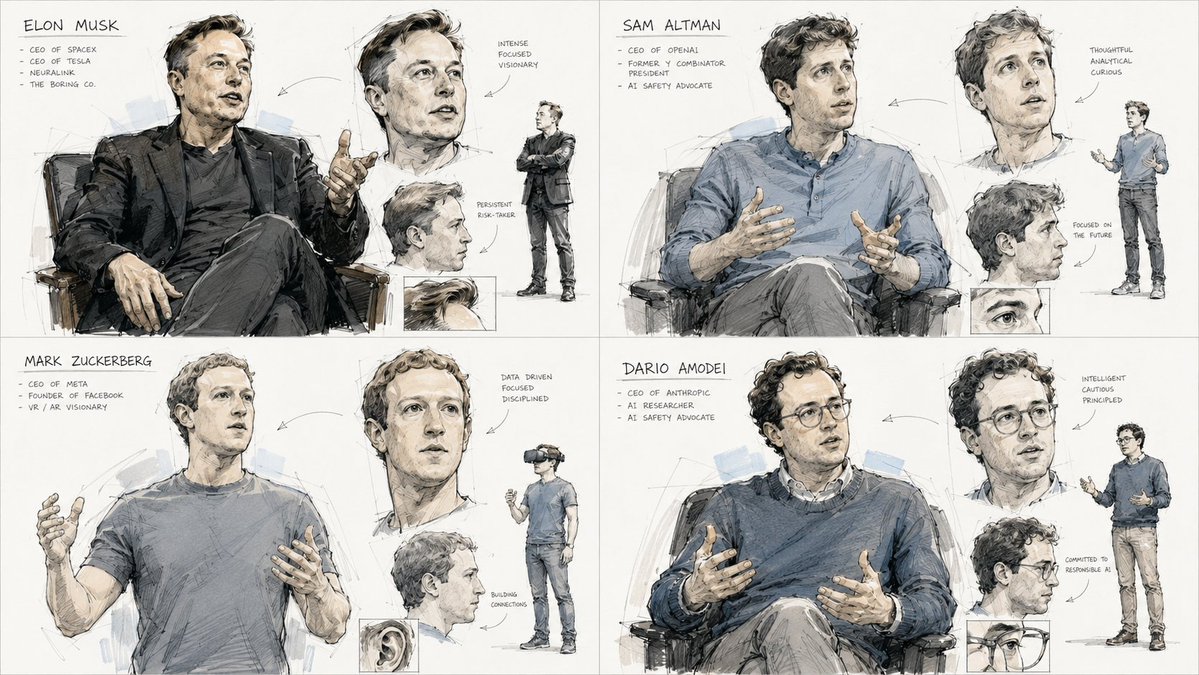
A 2x2 grid character sketch sheet featuring sketches of Elon Musk, Sam Altman, Mark Zuckerberg, and Dario Amodei. Each panel includes primary gesture, facial expression studies, shadow blocking, and construction lines in a loose concept-art style, pencil and ink digital illustration.
Prompt
{ "task": "2x2 grid character sketch sheet, one panel per subject", "aspect_ratio": "16:9", "medium": "loose concept-art sketch, pencil and ink, digital illustration", "subjects": [ "Elon Musk", "Sam Altman", "Mark Zuckerberg", "Dario Amodei" ], "panel_layout": { "grid": "2x2", "rule": "one character per quadrant, identical visual system applied to all four panels for consistency" }, "sketch_system": { "primary_gesture": { "description": "Full-body or focal-crop gestural drawing of the subject, rough confident contour lines", "placement": "centerpiece of the panel, dynamically cropped", "line_weight": "thickest line weight on silhouette edges" }, "secondary_studies": { "description": "Close-up facial expression study, alternate pose fragment, detail crop of accessory or hair", "placement": "scattered around the centerpiece, connected by faint gestural arrows" }, "shadow_blocking": { "description": "Flat cel-shaded shadow patches with soft edges", "placement": "layered beneath the line art, only on the occluded side of forms" }, "construction_lines": { "description": "Leftover guide strokes, perspective marks, circular joint markers, visible eraser marks", "placement": "thin, low-opacity strokes underneath the final ink layer" } }, "palette": ["warm beige", "cream", "charcoal", "cool grey", "soft blue", "muted skin tone"], "background": "white studio background", "output": "single image, 2x2 grid of four sketch-sheet panels, one famous scientist per panel" }
Kynvio Prompt Workflow
How to use this prompt
Open it in Image Studio
Send the prompt to Kynvio AI without starting a generation.
Adapt the details
Replace the subject, setting, colors, text, or composition for your goal.
Review and generate
Choose your final settings, then click Generate when you are ready.
Related GPT Image 2 prompts
GPT Image 2 prompts
About this prompt
Will opening this prompt spend credits?
No. The button only prefills Image Studio. Credits are used only after you start a generation.
Can I edit the prompt first?
Yes. The transferred text is fully editable before you generate an image.