
Adidas Caps Instagram Post Design
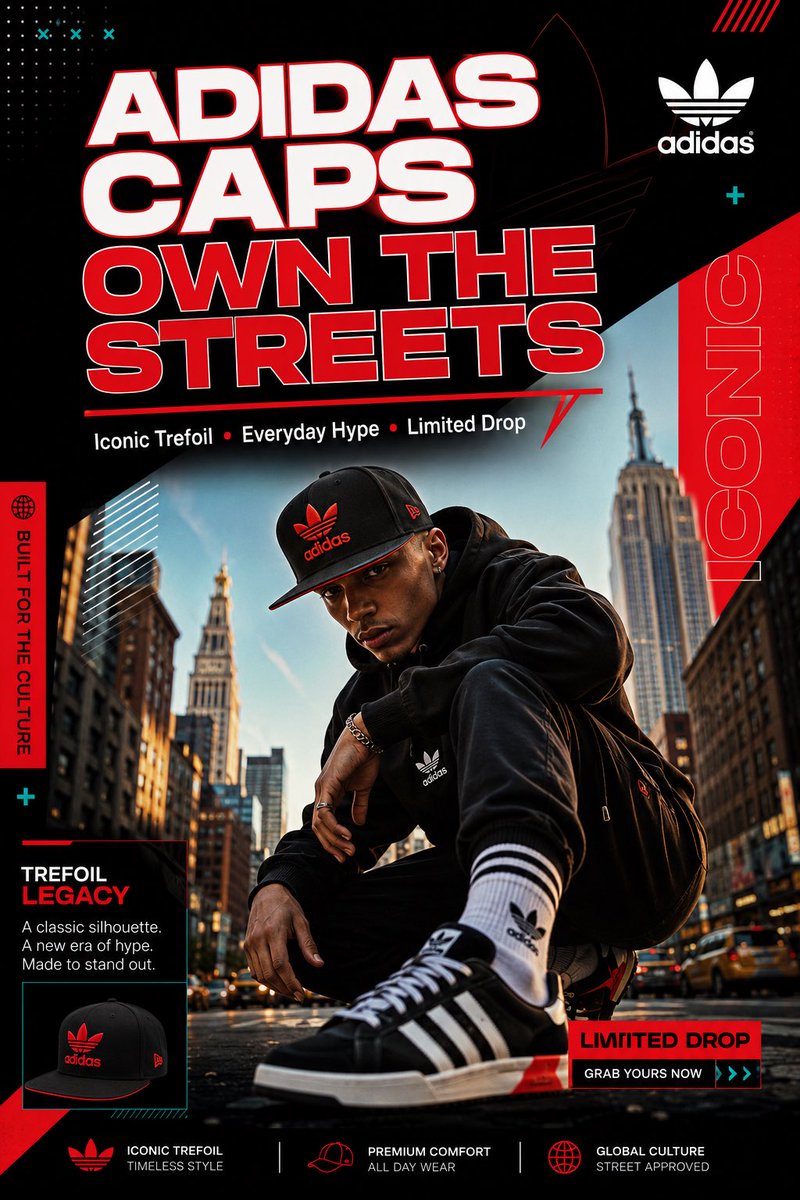
Create a scroll-stopping Instagram post for Adidas black snapback cap in a vibrant modern graphic design style with dynamic layout, bold sans-serif typography, geometric shapes, high contrast, and cohesive branding.
Prompt
Create one single, scroll-stopping Instagram post (1080x1350 px, portrait) for Adidas caps in a vibrant modern graphic design style: dynamic layout, bold sans-serif typography, geometric shapes and accents, high contrast, clean hierarchy, premium energetic feel with cohesive branding — exactly like the travel agency templates, fintech flyers, cafe collections, and bicycle equipment posts. Subject: Adidas black snapback cap with red trefoil logo and details. Visual style: - Main hero image: Confident model wearing the black Adidas snapback on a vibrant urban NYC street at golden hour, dynamic low-angle shot, streetwear outfit (hoodie + sneakers). - Bold large headline at top: "ADIDAS CAPS OWN THE STREETS" in white with red outline and subtle geometric underline. - Subtle supporting text below: "Iconic Trefoil • Everyday Hype • Limited Drop". - Clean Adidas trefoil logo integrated in corner. - Vibrant cohesive palette: Deep black background with bold red accents, white text, subtle teal geometric overlays for energy. - Aspirational street vibe with high contrast, generous negative space, subtle glows and shadows on the cap for premium feel. - Overall: Professional template look — eye-catching, mobile-first, scroll-stopping. Output a detailed description of the full layout (exact positioning of image, text, accents, colors) so I can recreate it perfectly in Canva or Figma. Make it premium and hype.
Kynvio Prompt Workflow
How to use this prompt
Open it in Image Studio
Send the prompt to Kynvio AI without starting a generation.
Adapt the details
Replace the subject, setting, colors, text, or composition for your goal.
Review and generate
Choose your final settings, then click Generate when you are ready.
Related GPT Image 2 prompts
GPT Image 2 prompts
About this prompt
Will opening this prompt spend credits?
No. The button only prefills Image Studio. Credits are used only after you start a generation.
Can I edit the prompt first?
Yes. The transferred text is fully editable before you generate an image.