
10 Prompts and 3 Principles to Boost GPT Image2 Quality
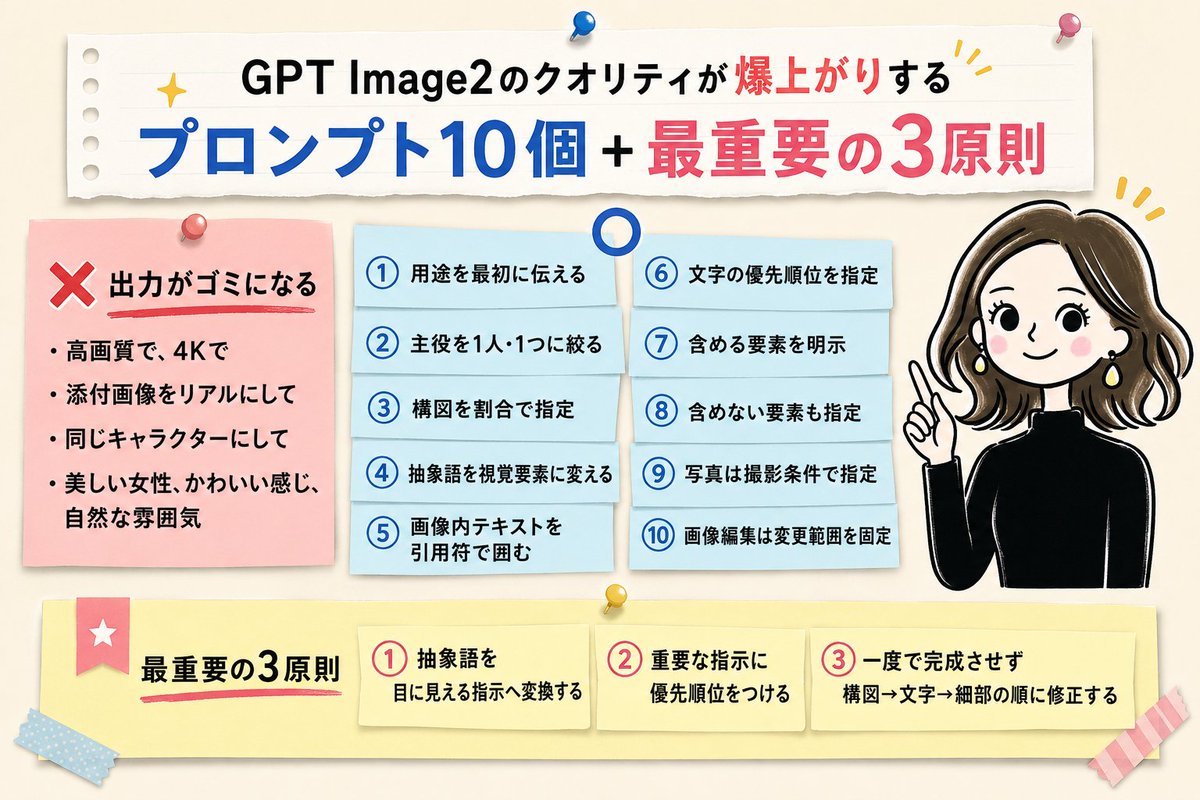
This article introduces 10 effective prompts and 3 core principles to help users generate higher quality images with GPT Image2. It covers avoiding common bad prompts, how to structure prompts, and a step-by-step optimization approach.
Prompt
10 prompts to drastically improve GPT Image2 quality + 3 most important principles ❌ Garbage · High quality, 4K · Make attached image realistic · Keep same character ⭕️ ① State the purpose first ② Limit the main subject to one person or one object ③ Specify composition by ratio ④ Convert abstract words into visual elements ⑤ Enclose in-image text in quotation marks ⑥ Specify priority of text ⑦ Explicitly state elements to include ⑧ Also specify elements to exclude ⑨ For photos, specify shooting conditions ⑩ For image editing, fix the scope of changes 3 Most Important Principles ① Convert abstract words into visible instructions ② Prioritize important instructions ③ Don't aim for completion in one go; revise in order of composition → text → details
Kynvio Prompt Workflow
How to use this prompt
Open it in Image Studio
Send the prompt to Kynvio AI without starting a generation.
Adapt the details
Replace the subject, setting, colors, text, or composition for your goal.
Review and generate
Choose your final settings, then click Generate when you are ready.
Related GPT Image 2 prompts
GPT Image 2 prompts

About this prompt
Will opening this prompt spend credits?
No. The button only prefills Image Studio. Credits are used only after you start a generation.
Can I edit the prompt first?
Yes. The transferred text is fully editable before you generate an image.